#!/bin/bash

seconds=0

echo -n "Enter number of seconds > "
read seconds

hours=$((seconds / 3600))
seconds=$((seconds % 3600))
minutes=$((seconds / 60))
seconds=$((seconds % 60))

echo "$hours hour(s) $minutes minute(s) $seconds second(s)"
Showing posts with label shell scripts. Show all posts
Showing posts with label shell scripts. Show all posts
Seconds to hours and minutes
This program format an arbitrary number of seconds into hours and minutes:


Fifth basic front end with dialog/Xdialog - Building a Gauge
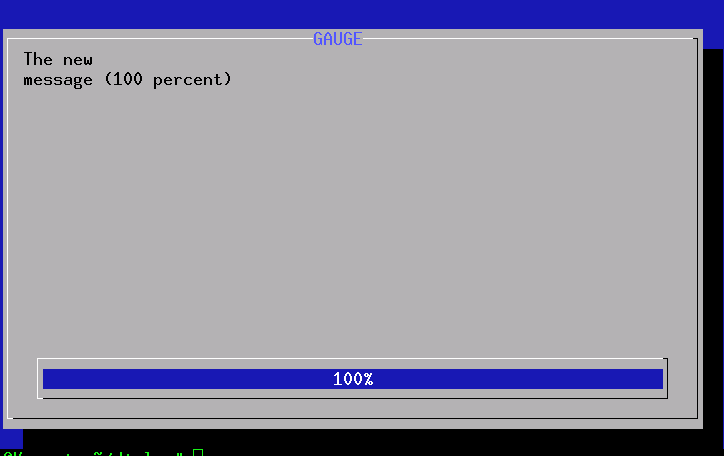
A gauge based on dialog can be used to indicate progress of your program. Building a gauge is slightly tricky. Look at the following example:
#!/bin/shHere the dialog program gets its input from the code shown within the parentheses. This code emits the number to be used for gauge and the message to be shown. The message to be shown in the gauge box must be surrounded by echo "XXX". The screen-shot of a gauge is shown below.
DIALOG=${DIALOG=dialog}
COUNT=10
(
while test $COUNT != 110
do
echo $COUNT
echo "XXX"
echo "The new\n\message ($COUNT percent)"
echo "XXX"
COUNT=`expr $COUNT + 10`
sleep 1
done
) |
$DIALOG --title "My Gauge" --gauge "Hi, this is a gauge widget" 20 70 0
Fourth basic front end with dialog/Xdialog - Radiolist and Checklist
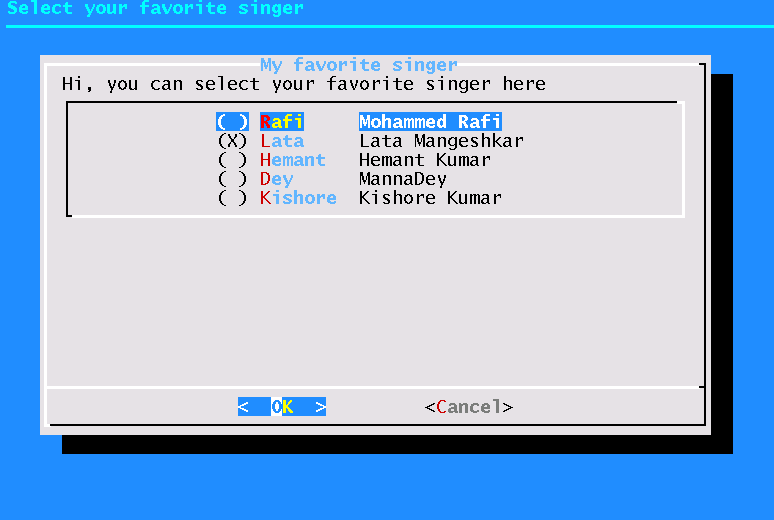
Radiolists and checklists can be programmed just like menus. A simple radio list example is given below.
#! /bin/sh
DIALOG=${DIALOG=dialog}
tempfile=`tempfile 2>/dev/null` || tempfile=/tmp/test$$
trap "rm -f $tempfile" 0 1 2 5 15

$DIALOG --backtitle "Select your favorite singer" \
 --title "My favorite singer" --clear \
      --radiolist "Hi, you can select your favorite singer here  " 20 61 5 \
      "Rafi"  "Mohammed Rafi" off \
      "Lata"    "Lata Mangeshkar" ON \
      "Hemant" "Hemant Kumar" off \
      "Dey"    "MannaDey" off \
      "Kishore"    "Kishore Kumar" off \
      "Yesudas"   "K. J. Yesudas" off  2> $tempfile

retval=$?

choice=`cat $tempfile`
case $retval in
0)
  echo "'$choice' is your favorite singer";;
1)
  echo "Cancel pressed.";;
255)
  echo "ESC pressed.";;
esac
A screen shot is shown below.
Third basic front end with dialog/Xdialog - building menu
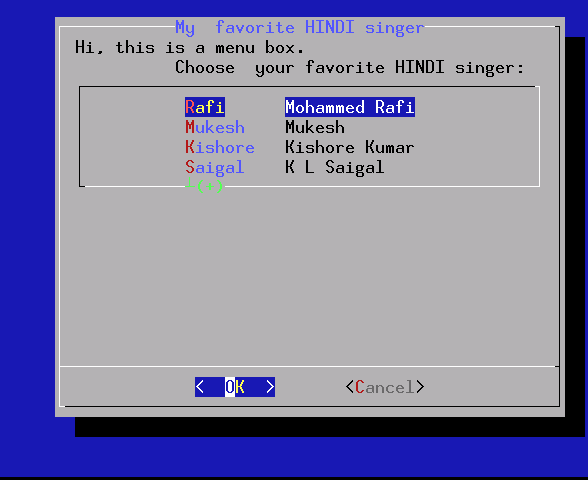
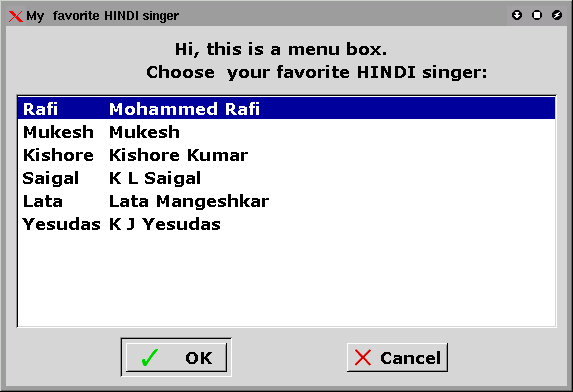
Try the following program both in console and X (after changing dialog to Xdialog as before):


#!/bin/shThe results are as below
DIALOG=${DIALOG=dialog}
tempfile=`tempfile 2>/dev/null` || tempfile=/tmp/test$$
trap "rm -f $tempfile" 0 1 2 5 15
$DIALOG --clear --title "My favorite HINDI singer" \
--menu "Hi, Choose your favorite HINDI singer:" 20 51 4 \
"Rafi" "Mohammed Rafi" \
"Mukesh" "Mukesh" \
"Kishore" "Kishore Kumar" \
"Saigal" "K L Saigal" \
"Lata" "Lata Mangeshkar" \
"Yesudas" "K J Yesudas" 2> $tempfile
retval=$?
choice=`cat $tempfile`
case $retval in
0)
echo "'$choice' is your favorite hindi singer";;
1)
echo "Cancel pressed.";;
255)
echo "ESC pressed.";;
esac
Second basic front end with dialog/Xdialog
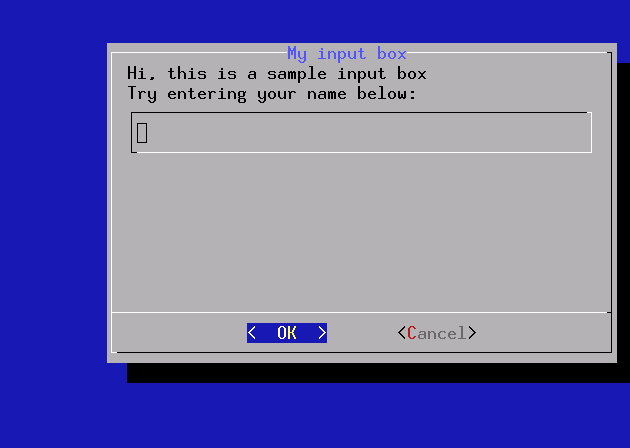
The following script reads a string you input and prints it back.
#!/bin/sh
DIALOG=${DIALOG=dialog}
tempfile=`tempfile 2>/dev/null` || tempfile=/tmp/test$$
trap "rm -f $tempfile" 0 1 2 5 15
$DIALOG --title "My input box" --clear \
--inputbox "Hi, this is a sample input box\n
Try entering your name below:" 16 51 2> $tempfile
retval=$?
case $retval in
0)
echo "Input string is `cat $tempfile`";;
1)
echo "Cancel pressed.";;
255)
if test -s $tempfile ; then
cat $tempfile
else
echo "ESC pressed."
fi
;;
esac
Try running the program under console and under X ( after changing dialog to Xdialog as above)

#!/bin/sh
DIALOG=${DIALOG=dialog}
tempfile=`tempfile 2>/dev/null` || tempfile=/tmp/test$$
trap "rm -f $tempfile" 0 1 2 5 15
$DIALOG --title "My input box" --clear \
--inputbox "Hi, this is a sample input box\n
Try entering your name below:" 16 51 2> $tempfile
retval=$?
case $retval in
0)
echo "Input string is `cat $tempfile`";;
1)
echo "Cancel pressed.";;
255)
if test -s $tempfile ; then
cat $tempfile
else
echo "ESC pressed."
fi
;;
esac
Try running the program under console and under X ( after changing dialog to Xdialog as above)
Basic front end with dialog/Xdialog
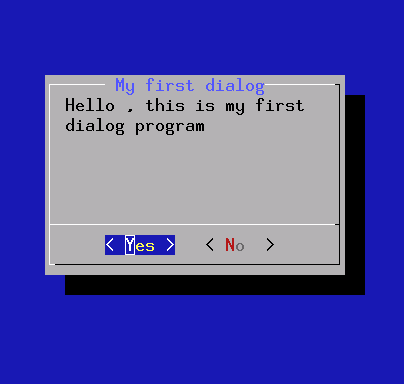
This script displays a simple YES/NO box.
#!/bin/bash
DIALOG=${DIALOG=dialog}
$DIALOG --title " My first dialog" --clear \
--yesno "Hello , this is my first dialog program" 10 30
case $? in
0)
echo "Yes chosen.";;
1)
echo "No chosen.";;
255)
echo "ESC pressed.";;
esac
A screen-shot of the above program is given below.

#!/bin/bash
DIALOG=${DIALOG=dialog}
$DIALOG --title " My first dialog" --clear \
--yesno "Hello , this is my first dialog program" 10 30
case $? in
0)
echo "Yes chosen.";;
1)
echo "No chosen.";;
255)
echo "ESC pressed.";;
esac
A screen-shot of the above program is given below.
Backup reminder script
#!/bin/bash
DIALOG=Xdialog
BACKUP_SCRIPT=backup_script
BACKUP_TIME="2pm"
BACKUP_DAYS=1
SNOOZE_MINS=5
$DIALOG --display=:0.0 --wrap --title "Backup Reminder" \
--ok-label Continue \
--cancel-label Snooze \
--yesno "You need to do a backup now. Please attach \
your external backup drive and click 'Continue' to continue \
with the backup or 'Snooze' to postpone the backup for a few \
minutes or close the window to skip this scheduled backup \
and reschedule the backup for next time." 15 60 &> /dev/null
return_value=$?
# if the command succeeded (the user clicked continue)
# proceed with the backup
if [ $return_value = 0 ]; then
$BACKUP_SCRIPT
success=$?
# if the backup script succeeded then send mail to
# the user and schedule the next backup
if [ $success = 0 ]; then
echo "backup succeeded. scheduling next backup for"
echo $0 | at $BACKUP_TIME + $BACKUP_DAYS days
# the backup script failed so stop the backup loop
# and mail the user the failed message
else
echo "backup failed! stopping backup loop! please check your backup script and re-run this script!"
fi
# the backup has been skipped (user closed the window)
# so reschedule the backup for the next scheduled time
elif [ $return_value = 255 ]; then
echo "backup skipped. scheduling next backup for"
echo $0 | at $BACKUP_TIME + $BACKUP_DAYS days
# either the dialog command failed because X wasn't available
# or the user snoozed the backup, so reschedule the backup
else
echo $0 | at now + $SNOOZE_MINS minutes &> /dev/null
fi
DIALOG=Xdialog
BACKUP_SCRIPT=backup_script
BACKUP_TIME="2pm"
BACKUP_DAYS=1
SNOOZE_MINS=5
$DIALOG --display=:0.0 --wrap --title "Backup Reminder" \
--ok-label Continue \
--cancel-label Snooze \
--yesno "You need to do a backup now. Please attach \
your external backup drive and click 'Continue' to continue \
with the backup or 'Snooze' to postpone the backup for a few \
minutes or close the window to skip this scheduled backup \
and reschedule the backup for next time." 15 60 &> /dev/null
return_value=$?
# if the command succeeded (the user clicked continue)
# proceed with the backup
if [ $return_value = 0 ]; then
$BACKUP_SCRIPT
success=$?
# if the backup script succeeded then send mail to
# the user and schedule the next backup
if [ $success = 0 ]; then
echo "backup succeeded. scheduling next backup for"
echo $0 | at $BACKUP_TIME + $BACKUP_DAYS days
# the backup script failed so stop the backup loop
# and mail the user the failed message
else
echo "backup failed! stopping backup loop! please check your backup script and re-run this script!"
fi
# the backup has been skipped (user closed the window)
# so reschedule the backup for the next scheduled time
elif [ $return_value = 255 ]; then
echo "backup skipped. scheduling next backup for"
echo $0 | at $BACKUP_TIME + $BACKUP_DAYS days
# either the dialog command failed because X wasn't available
# or the user snoozed the backup, so reschedule the backup
else
echo $0 | at now + $SNOOZE_MINS minutes &> /dev/null
fi
Check low space
#!/bin/bash

PATHS="/export/home /home"
AWK=/usr/bin/awk
DU="/usr/bin/du -ks"
GREP=/usr/bin/grep
DF="/usr/bin/df -k"
TR=/usr/bin/tr
SED=/usr/bin/sed
CAT=/usr/bin/cat
MAILFILE=/tmp/mailviews$$
MAILER=/bin/mailx
mailto="all@company.com"
for path in $PATHS

do
 DISK_AVAIL=`$DF $path |  $GREP -v "Filesystem" | $AWK '{print $5}'|$SED 's/%//g'`
 if [ $DISK_AVAIL -gt 90 ];then
  echo "Please clean up your stuff\n\n" > $MAILFILE
  $CAT $MAILFILE | $MAILER -s "Clean up stuff" $mailto
 fi
done
Locate running gnome-session and send a notification
#!/bin/bash
user=`whoami`
pids=`pgrep -u $user gnome-session`
title=$1
text=$2
timeout=$3
if [ -z "$title" ]; then
echo You need to give me a title >&2
exit 1
fi
if [ -z "$text" ]; then
text=$title
fi
if [ -z "$timeout" ]; then
timeout=60000
fi
for pid in $pids; do
# find DBUS session bus for this session
DBUS_SESSION_BUS_ADDRESS=`grep -z DBUS_SESSION_BUS_ADDRESS \
/proc/$pid/environ | sed -e 's/DBUS_SESSION_BUS_ADDRESS=//'`
# use it
DBUS_SESSION_BUS_ADDRESS=$DBUS_SESSION_BUS_ADDRESS \
notify-send -u low -t $timeout "$title" "$text"
done
user=`whoami`
pids=`pgrep -u $user gnome-session`
title=$1
text=$2
timeout=$3
if [ -z "$title" ]; then
echo You need to give me a title >&2
exit 1
fi
if [ -z "$text" ]; then
text=$title
fi
if [ -z "$timeout" ]; then
timeout=60000
fi
for pid in $pids; do
# find DBUS session bus for this session
DBUS_SESSION_BUS_ADDRESS=`grep -z DBUS_SESSION_BUS_ADDRESS \
/proc/$pid/environ | sed -e 's/DBUS_SESSION_BUS_ADDRESS=//'`
# use it
DBUS_SESSION_BUS_ADDRESS=$DBUS_SESSION_BUS_ADDRESS \
notify-send -u low -t $timeout "$title" "$text"
done
Ssh key authentication
#!/bin/bash
# This must be allowed on server end
# in /etc/sshd_config (default):
# RSAAuthentication yes
# PubkeyAuthentication yes
user='username'
host='hostname.com'
ssh-keygen -t rsa
cat >> ~/.ssh/config <<>> ~/.ssh/authorized_keys"
# done
ssh hostname.com
# This must be allowed on server end
# in /etc/sshd_config (default):
# RSAAuthentication yes
# PubkeyAuthentication yes
user='username'
host='hostname.com'
ssh-keygen -t rsa
cat >> ~/.ssh/config <<>> ~/.ssh/authorized_keys"
# done
ssh hostname.com
Subversion Repository Move
# Subversion Management
# create a gzipped dumpfile of a repository
svnadmin dump path-to-old-repo | gzip > ~/dumpfile.gz
# import into another repository from a gzipped dumpfile
gunzip -c ~/dumpfile.gz | svnadmin load path-to-new-repo
# relocated any existing working copies.
# See also http://svnbook.red-bean.com/en/1.5/svn.ref.svn.c.switch.html
cd path-to-working-copy-from-old-repo
svn switch --relocate file:///path/to/old-repo file:///path/to/new-repo .
# create a gzipped dumpfile of a repository
svnadmin dump path-to-old-repo | gzip > ~/dumpfile.gz
# import into another repository from a gzipped dumpfile
gunzip -c ~/dumpfile.gz | svnadmin load path-to-new-repo
# relocated any existing working copies.
# See also http://svnbook.red-bean.com/en/1.5/svn.ref.svn.c.switch.html
cd path-to-working-copy-from-old-repo
svn switch --relocate file:///path/to/old-repo file:///path/to/new-repo .
What is shell script
A shell script is a script written for the shell, or command line interpreter, of an operating system. It is often considered a simple domain-specific programming language. Typical operations performed by shell scripts include file manipulation, program execution, and printing text.
Subscribe to:
Posts (Atom)

 Posts
Posts

